 Admin
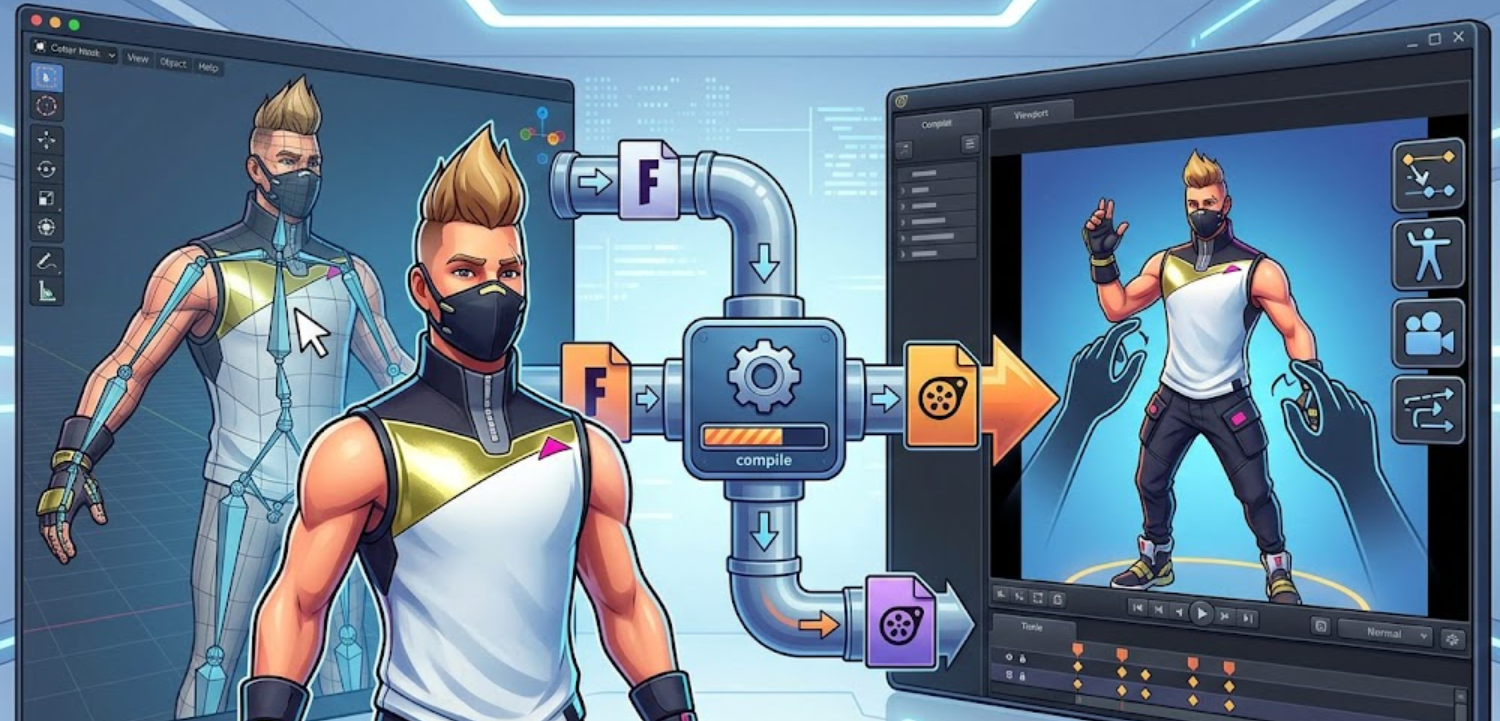
AdminThe SFM Compile Fortnite workflow refers to a community-created process used to bring Fortnite characters and assets into Source Filmmaker (SFM), even though the two systems are not naturally compatible. Since Fortnite is built on Unreal Engine and SFM relies on the Source Engine, direct importing is not possible, which is why users rely on a multi-step conversion pipeline. This workflow typically includes extracting game assets, converting them into Source-friendly formats, fixing rigs in Blender, and finally compiling them into .mdl files that SFM can read. It is widely used by animators who want to create cinematic scenes using Fortnite characters, but it is entirely unofficial and requires several external tools and manual adjustments to function properly.
Understanding Source Filmmaker Asset Requirements
Source Filmmaker has very strict asset requirements because it is built on the Source Engine, which does not support modern game engine formats like those used in Unreal Engine. All models must be precompiled into .mdl files, textures must be converted into .vtf format, and materials must be defined using .vmt scripts. Unlike newer engines that allow direct importing of assets, SFM depends entirely on preprocessed and optimized files, which means every model must be carefully prepared before it can be used inside the editor.
This structure is important for the SFM Compile Fortnite workflow because Fortnite assets are not designed for Source Engine compatibility. Even small mismatches in bone structure, texture paths, or shader definitions can cause models to fail or appear incorrectly in SFM. As a result, creators must fully understand how Source handles models, materials, and animations before attempting any conversion process, otherwise the imported assets will not function properly in the animation environment.
Extracting Fortnite Assets from Unreal Engine
The first technical step in the SFM Compile Fortnite workflow is extracting assets from Fortnite’s Unreal Engine files, which are stored in packaged and often compressed .pak files. These files contain all the game’s models, textures, animations, and materials, but they are not directly accessible or usable in SFM. To access them, modders typically use Unreal Engine asset viewers that can unpack and export the data into intermediate formats such as .fbx or .psk, which can then be edited in external software like Blender.
Once extracted, the assets are still not ready for Source Filmmaker because they retain Unreal-specific structures, including skeletons, material setups, and mesh optimizations designed for a completely different rendering system. At this stage, the files serve only as a base reference, and significant conversion work is still required before they can be adapted into Source Engine-compatible formats for use in SFM projects.
Converting Models for Source Engine Compatibility
After extracting Fortnite assets, the next stage in the SFM Compile Fortnite workflow is converting those models into formats that the Source Engine can actually understand. This usually happens inside Blender, where the imported Unreal Engine files are cleaned, restructured, and exported into Source-compatible formats like .smd or .dmx. During this process, artists often need to simplify geometry, fix UV maps, and adjust scale so the model behaves correctly in SFM. Without these adjustments, the model may appear distorted, oversized, or completely broken once compiled.
This conversion step is also where most compatibility issues begin to show. Fortnite uses modern rendering techniques and PBR materials, while Source Filmmaker relies on a much older and simpler shading system defined through .vmt files. Because of this difference, textures must often be rebaked or remapped manually, and shader effects like metallic reflections or advanced lighting do not translate directly. The goal of this stage is not just conversion, but transformation—reshaping the model so it fits the technical limits of the Source Engine while still preserving its visual identity.
Rigging and Fixing Fortnite Characters in Blender
Once the Fortnite models are converted into Source-friendly formats, the next step in the SFM Compile Fortnite workflow is rigging and fixing the character inside Blender. This involves adjusting the skeleton structure so it matches the Source Engine’s bone system, which is significantly different from Unreal Engine’s rigging setup. Artists often need to reassign bones, correct joint hierarchies, and ensure that the mesh deforms properly when animated. If this step is not handled carefully, characters can appear broken, twisted, or completely unresponsive inside Source Filmmaker.
Compiling Models Using Crowbar and StudioMDL
The final technical step in the SFM Compile Fortnite workflow is compiling the prepared model into a format that Source Filmmaker can actually load. This is done using tools like Crowbar or Valve’s official studiomdl compiler. At this stage, the cleaned and rigged Blender exports (usually .smd or .dmx files) are processed along with a QC script, which acts as instructions for how the model should be assembled, including its skeleton, textures, and physics data. Once the compilation runs successfully, the output is a .mdl file that can be placed into SFM’s directory and used directly in animation scenes.
However, this step is rarely straightforward because even small mistakes in the QC file or exported data can cause compilation failures. Missing bone references, incorrect file paths, or mismatched texture names are some of the most common issues that stop the model from building correctly. When everything is set up properly, though, the compiled Fortnite character becomes fully usable in Source Filmmaker, ready for animation, posing, and cinematic scene creation.
Common Errors and How to Fix Them
During the SFM Compile Fortnite workflow, errors are extremely common because the process involves multiple tools, file formats, and engine conversions. One of the most frequent problems is broken models, where the character appears invisible or distorted inside Source Filmmaker. This usually happens due to missing .mdl files, incorrect compile paths, or errors in the QC script. Another common issue is animation failure, where the model loads but stays frozen in a T-pose, which typically indicates that bone structures were not properly assigned or exported from Blender.
Texture-related errors are also very common, especially when .vmt or .vtf files are missing or incorrectly referenced. In these cases, models may appear pink, black, or completely untextured. Fixing these issues usually involves checking folder structure, correcting file names, and ensuring all paths in the material files match SFM’s expected directory setup. Most problems in this workflow are not engine bugs but simple configuration mistakes that require careful review of each conversion step.
Best Practices and Legal Considerations for SFM Fortnite Projects
When working with the SFM Compile Fortnite workflow, consistency and organization make a major difference in avoiding repeated errors. One of the most effective practices is keeping a clean folder structure throughout the entire pipeline, from extracted Unreal assets to final compiled SFM files. Naming conventions should remain consistent across Blender exports, texture files, and QC scripts, because even a small mismatch can break the compilation process. It is also helpful to test models in stages rather than waiting until the end, since catching issues early in Blender saves significant time compared to debugging inside SFM.
On the legal side, Fortnite assets are protected under Epic Games’ intellectual property guidelines, which means they cannot be redistributed or used commercially without permission. While fan-made animations are generally tolerated for non-commercial and educational use, sharing extracted models or packaged assets publicly can violate terms of service. For that reason, most creators treat this workflow as a personal learning or portfolio exercise rather than a way to distribute usable game content. Respecting these boundaries ensures that projects remain safe and compliant while still allowing creative experimentation inside Source Filmmaker.
Conclusion
The SFM Compile Fortnite workflow is a complex but interesting process that bridges two very different game engines—Unreal Engine and Source Filmmaker. It involves extracting assets, converting models, fixing rigs in Blender, and compiling everything into Source-compatible formats. While the workflow is not official and requires multiple third-party tools, it remains popular among animators who want to bring Fortnite-style characters into cinematic SFM projects.
FAQs
1. Can Fortnite models be directly used in SFM?
No, they must be converted into Source Engine formats before they can be used.
2. What is the hardest part of the SFM Compile Fortnite workflow?
Rigging and fixing bone structures in Blender is usually the most time-consuming step.
3. Do I need Crowbar for SFM model compilation?
Yes, Crowbar is commonly used to compile .smd or .dmx files into .mdl format.
4. Is it legal to use Fortnite assets in SFM animations?
Personal, non-commercial use is generally allowed under Epic’s fan content policy, but redistribution of assets is not permitted.
Visit For More Information:- Supper Magazines